Binance PAN verification in India, and what to do when it fails
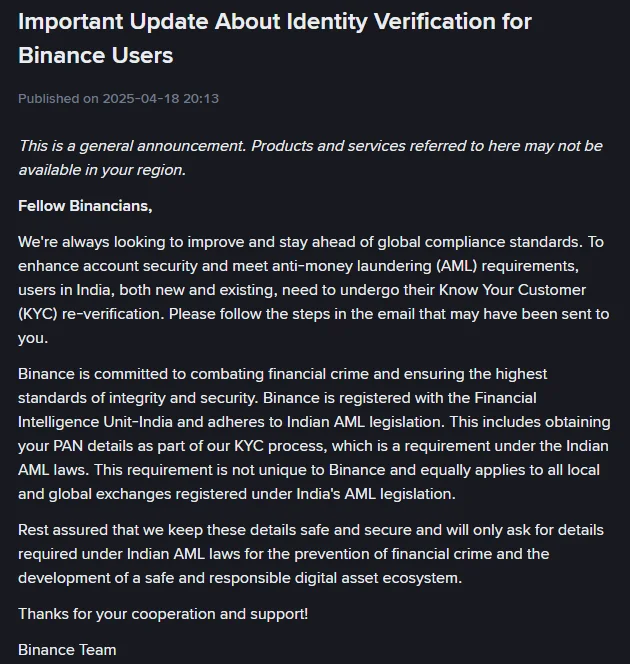
When a Binance KYC check fails in India, compare every detail you confirmed with your ID document, check the face-scan rules (face uncovered, enough light), and appeal through Self-Service if the decision still looks wrong. The PAN request comes from Binance's 2025 notice that users in India, new and existing, must re-verify by following the steps in an email it may have sent. A pop-up about the sender when crypto arrives is a separate Travel Rule check.
Why did my Binance PAN verification fail?
| What happened | What to do |
|---|---|
| Your identity check was rejected | Compare what you confirmed with the document: everything entered must be “consistent with your ID documents” and cannot be changed once confirmed. A detail you typed wrongly is a question for customer service; only a detail that has really changed on the document goes through Update Identity (how to correct a wrong name or ID number). Check that the document type is one offered for India and that both sides of an ID card were uploaded. If all of that is right, use “Appeal KYC Rejection” (where to find it) |
| The face check failed | Allow the camera; no hat, glasses or filters; enough light; face centred, eyes open; do not refresh the browser or quit the app midway. Then use “Failed Facial Verification Appeal” (where to find it) |
| The account shows “Withdraw Only” | Finish [Verified] from the Identification page, or finish submitting an identity update you declared |
| Withdrawals are temporarily suspended after you submitted identity details | Incomplete information is one cause on Binance’s page about why verification is needed; contact Binance Support to supply what is missing. The same page lists other causes, such as signing in from multiple IP addresses |
| Your withdrawal amount is limited | Complete the face verification step |
| Your proof of address was refused | Check that it is no older than 2 months, the window Binance sets for India; that it shows the same name as the ID and the same address as typed; and that it is not a photocopy (address rules) |
Binance’s verification pages and its 2025 India announcement give no PAN-specific rejection messages and do not mention a PAN that has become inoperative. PAN and Aadhaar are linked on the Income Tax Department’s e-filing portal through its “Link Aadhaar” quick link, and its Link Aadhaar FAQ explains when a PAN becomes inoperative.
For rejections with causes outside PAN, such as a blurred photo, why Binance verification fails goes through each one.
How do I correct a wrong name or ID number after submitting?
Confirmed details cannot be edited, so the route depends on why they are wrong. The verification page lists the acceptable reasons for an update: an expired document, a changed name or ID number, a changed nationality, documents needed for a fiat channel or the Binance Card, and switching the name to “a system-recognizable language”. A typing mistake is not among them. For cases like that, the update page says: “If the reason for your update is not on the drop-down list provided, please consult with our customer service team.” For the legal name or the date of birth, the app’s Verification Center, as shown on the same update page, points to a “Name Correction Appeal” or a “Date of Birth Correction Appeal”.
A detail that has genuinely changed, such as a new name or a new ID number on the document, goes through Update Identity. Know the cost first: “upon declaring to update your KYC materials, your account will be restricted to ‘Withdrawal Only’ mode until all of your new information has been submitted and verified.”
India is one of the residence countries that get a direct link for it: How to Update My Verified Identity Information? tells those users they “may click on the link [Click here to reset KYC]”.
The steps, from the website’s [Update Identity] button or the app’s [Verifications] menu:
- Select the reason for the update and click [Continue].
- Select the document’s issuing country or region and the document type, then [Continue].
- Follow the instructions to the end.
- Wait for the email saying the system review is complete. “Thereafter, you can proceed to submit your KYC verification again.”
If the update will not start at all, the update page says to reach out to Binance Support. For a changed name or ID number, changing verified KYC details on Binance covers what each kind of update needs.
How do I appeal a rejected Binance KYC?
The route for contesting a KYC decision, as Binance’s Privacy Portal gives it:
- Open the app or website and sign in.
- Go to your profile and select the headphone or chat icon.
- Click “View more” in the Self-Service section and scroll to the KYC section.
- Choose the option that fits, such as “Failed Facial Verification Appeal” or “Appeal KYC Rejection”.
A KYC support agent then reviews the case manually and gets back to you. The same page says KYC uses automated decision-making and that “this process isn’t perfect, and sometimes errors can occur.” Before you appeal, fix any mismatched detail, face-check problem or document issue you can.
How do I re-verify my Binance account in India?
Re-verification starts from an email. Binance’s announcement of 18 April 2025 asks users in India, “both new and existing”, to undergo KYC re-verification, and to “follow the steps in the email that may have been sent to you”. Before acting on one, enter the email address it came from on the Binance Verify page, which checks whether an email address, URL, phone number or social account is officially from Binance, and look for your anti-phishing code if you set one: Binance includes it in every genuine email. Then sign in through the app, or by typing the website address yourself, rather than through a link in the message.
Already verified and no email has arrived? Look at the Identification page after signing in, or ask Binance Support. The [Click here to reset KYC] link is for a document detail that has changed, not for re-verification, and it restricts the account to Withdrawal Only.
An account that has not completed [Verified] yet goes through the standard steps, which start from the Identification page:
- On the website, hover over the profile icon, click [Account], go to [Identification] and click [Get Verified]. In the app, tap [Verify Now] on the home page, or tap the account centre icon and then [Unverified].
- Select your Residence, the Document Issuing Country/Region and the Document Type.
- Upload the document, or scan the QR code to carry on with your phone. Binance notes that “Manual upload option availability depends on the country.”
- For an ID card, upload both the front and the back.
- Complete the liveness check by following the instructions on screen.
- Confirm your personal information. Here Binance warns: “Please make sure that all the information entered is consistent with your ID documents. You won’t be able to change it once confirmed.”
- Wait for the notification. “Submitted documents are usually reviewed within 48 hours. However, it may take longer in some particular cases.” If 48 hours pass with no result, see what to do when Binance verification is still pending.
Stay on the page until the end. The website steps say “Do not refresh your browser during the process”, and the app steps say not to refresh or quit the app.
Which ID documents can I use for Binance KYC in India?
Use a document from the Document Type menu that appears once you choose India as the issuing country. The general wording on the verification page is: “Most users can choose to verify with a passport, ID card, or driver’s license. Please refer to the respective options offered for your country.” No separate India list is printed there, and neither Aadhaar nor the PAN card is named as an ID document, so whether either one is offered shows only in that menu.
One rule ties this choice to the address step. If you later add a proof of address, a national ID card showing your address “cannot be the same document used for identity verification”, so keep a different document for that step.
Do I need a selfie and proof of address too?
The selfie, yes. The liveness check is part of the standard [Verified] verification. The app instructions ask you to keep your whole face clearly visible and centred, with your eyes open, and add: “Do not wear hats, glasses, or use filters, and make sure that the lighting is sufficient.” Allow camera access before you start. If face verification is left unfinished, your withdrawal amount is limited, according to Binance’s page on why verification is needed.
Proof of address only if Binance asks for it. The address page describes “one or two documents”: proof of identity, and proof of address as the second. The address step is [Get Verified Plus], under [Profile], [Account], [Identification] on the website, or [Account Center], [Profile], [Verifications] in the app. If Binance asks for one, the document must be no older than 2 months, the window its validity table sets for India.
The document must show your name, “the same as the ID submitted”; your home address, “the same as the residential address entered”; the date of issue; the issuing authority; and a reference to that authority such as a logo or website. Photocopies are refused, since “photocopied documents are not acceptable”, and mobile phone bills are refused except in several jurisdictions. Review may take “up to 1-2 working days”. If one has already been turned down, check it against Binance’s accepted and refused address documents.
Is there a deadline, and what if I don’t re-verify?
The announcement gives no deadline, says nothing about what happens to an account that skips re-verification, and does not describe how the PAN is collected, whether typed in as a number or photographed from the card. A message that names a date or threatens a penalty is worth checking on Binance Verify before you act on it.
Why is Binance asking for my PAN card?
Indian anti-money-laundering (AML) law, according to Binance. The same announcement reads: “Binance is registered with the Financial Intelligence Unit-India and adheres to Indian AML legislation. This includes obtaining your PAN details as part of our KYC process, which is a requirement under the Indian AML laws.”
It adds that the requirement “is not unique to Binance and equally applies to all local and global exchanges registered under India’s AML legislation.”
Why does Binance ask for a PAN when I receive crypto?
That pop-up is the Travel Rule, not your KYC. To receive crypto from another exchange or a self-hosted wallet, open the crypto deposit page, click [Transactions Pending Credit] and fill in details about the originator, meaning the sender. The Travel Rule: Crypto Transfer Procedures announcement (19 June 2026, updated 23 June 2026) gives these examples of what the pop-up asks for:
- full name;
- Permanent Account Number (PAN) or National ID Number;
- country of residence, state, and city, village or town;
- Pin Code;
- address.
These are the sender’s details. If someone else sent the crypto, the pop-up is asking about them, so their name and PAN go in, not yours. The India FAQ, “What Is the Travel Rule in India?”, lists fewer sender details and no PAN: the sender’s full name, country of residence and, if applicable, the source exchange. Enter what the pop-up in front of you asks for.
Leave the details out and “Your transaction may be delayed or not processed”; in some cases it may be returned to the sender. If incorrect details get a transaction rejected, the FAQ says to follow Binance’s existing appeal process or contact Customer Support to have the funds returned to your source address. That is separate from the KYC appeal in Self-Service.
Is it safe to give Binance my PAN?
According to the announcement, Binance will “only ask for details required under Indian AML laws”, and its verification page says your documents are kept confidential. Enter your own PAN only inside your logged-in Binance account, never in reply to a private message. Binance Verify adds that “Binance will never request funds or tokens via private communications”, so a private message asking for funds or tokens to complete KYC is not from Binance.
Binance pages and one government FAQ · checked October 2026
The PAN requirement is from Binance’s Important Update About Identity Verification for Binance Users (18 April 2025, no update date shown). Steps, document wording, the liveness rules, the update reasons and the 48-hour figure are from “How to Complete Identity Verification for a Personal Account?” (updated 16 June 2026). The reset KYC link, the drop-down note and the Withdrawal Only note are from “How to Update My Verified Identity Information?” (updated 13 March 2026). The 2-month window for India and the address rules are from “How to Verify My Residential Address on Binance?” (updated 11 June 2026). The face-verification limit and the causes of suspended withdrawals are from “Why Do I Need to Complete Identity Verification for My Binance Account?” (updated 8 April 2026). The appeal route is from Binance’s Privacy Portal, and the scam warning from Binance Verify; neither shows a date. The anti-phishing code note is from “What Is an Anti-Phishing Code and How to Set It up on Binance?”. The deposit pop-up is from “Travel Rule: Crypto Transfer Procedures” (updated 23 June 2026) and “What Is the Travel Rule in India?” (updated 23 June 2026). The PAN-Aadhaar note points to the Income Tax Department’s Link Aadhaar FAQ. Each Binance page shows its own date; if a date there is newer than the one above, read the live page before relying on a detail.
Short answers on PAN and KYC in India
I verified on Binance before. Do I have to verify again in India?
Binance's April 2025 announcement says users in India, both new and existing, need to undergo KYC re-verification, and asks them to follow the steps in the email that may have been sent to them.
Can I verify my Binance account with the PAN or ID of a family member?
No. Using someone else's document is ruled out: Binance's verification page says you cannot transfer your account to another person or substitute another person's ID for your ID.
Does the Travel Rule pop-up affect my trading?
It does not. Binance's India Travel Rule FAQ says the changes only affect crypto deposits and withdrawals, and that no action is required if you do not move crypto in or out of your account.