When verified identity details can be updated on Binance, and what it costs
An expired document, or a name, ID number or nationality that has changed, lets you update a verified identity on Binance; three further listed reasons cover a fiat channel's requirements, a switch to a system-recognisable language and Binance Card. Start from Update Identity on the Identification page. The account stays in Withdrawal Only until the new documents are verified, and another person's identity can never be swapped in.
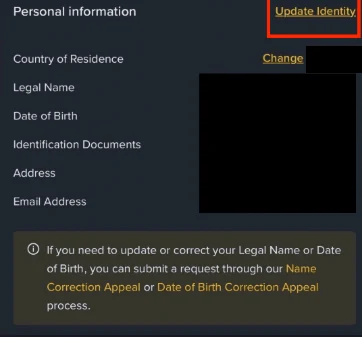
A typing mistake you confirmed is not one of the reasons. For the legal name or the date of birth, the app’s Verification Center shown on Binance’s identity update page points to a “Name Correction Appeal” or a “Date of Birth Correction Appeal”; for anything else outside the list, the page says to consult customer service.
Which reasons Binance accepts for an identity update
Binance’s verification page lists the “acceptable reasons for updating your identity verification”:
- The documents have expired.
- The name on the document has changed.
- The ID number on the document has changed.
- The nationality has changed.
- Updating or replacing documents to meet a specific fiat channel’s requirements.
- Changing the name to a system-recognisable language, for example from a local-language ID card to an English-language passport.
- Updating documents to meet Binance Card requirements.
Each one is about your own identity changing or being re-documented. What is not on the list is ruled out in the same breath: “You cannot transfer your account to another person or substitute another person’s ID for your ID.”
If the reason you need is not in the drop-down, Binance’s update page says to “consult with our customer service team”. That is the route for a misread character you confirmed by mistake.
How to update identity verification on Binance (website and app)
From the website, Binance’s steps:
- Go to the [Identification] page and click [Update Identity]. On the app, it is under the account information, then [Verifications], then [Update Identity].
- Select the reason for updating and click [Continue].
- Select the document’s issuing country or region and the document type, and click [Continue]. Manual upload availability “depends on the country”; otherwise the capture is handed to your phone.
- Follow the instructions through the document photos and the face check.
- Wait for the email notification when the system has processed the request.
Binance’s update page adds that after the system review you “can proceed to submit your KYC verification again”. The figures Binance gives for a verification submission are “usually within 48 hours” for the review and up to 10 attempts a day; what each kind of wait means is in how long verification takes.
Withdrawal Only during a KYC update: what you can still do
The update page’s note is the part to plan around: “upon declaring to update your KYC materials, your account will be restricted to ‘Withdrawal Only’ mode until all of your new information has been submitted and verified.”
Withdrawal Only means you can withdraw, cancel orders, close positions and redeem, and nothing else: no deposits, no new trades. So before starting an update:
- Decide what to do with open positions first: while the update runs you can close them but not open new ones.
- Finish any P2P order.
- Have the new document and a good camera ready, so the restricted window is as short as the review.
- Do not start an update the day before you need to deposit.
Expired passport, name change, new nationality: what each update needs
Expired document. The simplest case: same person, same details, new document. Start it once the new document is in your hands, so the Withdrawal Only window is the length of the review, not of a passport renewal.
Name changed. The new identity document must show the new name. The update asks for an identity document from the list for your issuing country, so a certificate of the name change is not a substitute for it.
ID number changed. Some countries issue a new number with a new document type or on renewal. Update with the new document.
Nationality changed. A new passport from a new country. This is also the case most likely to interact with residence rules, because eligibility can depend on citizenship; read updating residence after a move if the move and the new passport came together.
Fiat channel or Binance Card requirements. Binance’s verification page says that depending on your region or payment channel you may need to raise your verification level; this reason covers re-documenting the account for that.
Name in a different script. Switching from a local-language ID to an English-language passport so the system reads the name reliably. The name on the account changes to the passport’s transliteration, which is the one you should then use everywhere on the account.
Countries that use a certificate of residence
Binance’s update page opens with a note for users holding a certificate of residence in a listed set of countries, named on the page. For them the entry point is a link labelled [Click here to reset KYC] rather than the standard [Update Identity] button, and the page tells them to skip straight to the update section. The steps that follow are the same; only the door is different.
What a Binance identity update cannot do
- Changing the residential address. That is a different process, under [Edit Address] on the Identification page, with proof of address. See updating residence.
- Fixing a failed first verification. If you were never verified, you resubmit, you do not update. See verification failed or ID rejected.
- Freeing the identity for another account. The update replaces your document on this account. It does not detach the identity, and the one-account rule stays; see one account per person.
- Putting someone else on the account. Not permitted: the verification page rules out substituting another person’s ID for yours.
If the update will not start
Binance’s page closes with: “If you are unable to proceed with updating your verified identity, kindly reach out to Binance Support for assistance.” Use the support entry inside the app or website while logged in, state the reason you selected and where it stops, and keep the case ID.
Sources · checked October 2026
The seven reasons and the transfer prohibition are from Binance’s “How to Complete Identity Verification for a Personal Account?” (updated 5 June 2026) and are repeated on Binance’s re-verification FAQ (updated 14 March 2026). The steps, the Withdrawal Only restriction, the Verification Center screenshot with the two correction appeals, and the certificate-of-residence note are from “How to Update My Verified Identity Information?” (updated 14 March 2026). Review time and attempt limits are from the verification page and “How to Set up a Binance Account (Migrant Residents)” (updated 19 December 2025).