Why was my Binance verification rejected, and what do I change?
Each rejection message points to one thing to change. A photo problem means retaking the document photo; a failed face check, redoing it in different light or on another device; a details mismatch, matching every confirmed character to the document; an unaccepted document, switching to a type offered for your country. An identity already on another account, or a region rule, is not fixed by resubmitting; for those, or a refusal that looks wrong, there is an appeal.
Binance verification failed: the reasons, and whether resubmitting helps
| Message points to | What went wrong | Resubmit? | Change first |
|---|---|---|---|
| Document image: blurry, glare, cropped, edited, low resolution | The document could not be read | Yes | Retake in daylight, flat on a dark surface, all four corners in frame, no flash, no filters, from the native camera app |
| Document itself: expired, unsupported type, not accepted for this country | The document cannot be used, however good the photo | Only with a different document | Choose a document type the verification page offers for your issuing country |
| Details do not match: name, date of birth, number differ between the document and what you confirmed | The confirmed details do not match the document | Yes | On the confirmation screen, make every character match the document exactly, including middle names and diacritics |
| Face does not match or liveness failed | The face check was refused or did not match the document photo | Yes | Change light, device or distance (when face verification fails) |
| Identity already used | The document is verified on another account | No | Find and recover the other account (one account per person) |
| Not available in your region, or residence cannot be verified | A region rule or a residence that the document and address proof do not support | No | If you declared a country you do not live in, correct it; if the region is closed, no document fixes it |
Binance allows 10 attempts a day, and an unchanged submission spends one of them for the same result. Two of the six cannot be fixed by anything you upload. If the message is about an identity already in use, the problem is a second account, covered in one account per person. If it is about the region, the options are in updating residence and what you need before signing up.
ID photo blurry, cropped or with glare: how to retake it
Binance’s page gives few photo rules beyond its step instructions. These habits keep the image readable:
- The whole document, all four corners, with no fingers or objects over any part.
- Flat and square to the camera, not at an angle.
- Daylight or even room light, no flash, and no glare across the photo or the hologram.
- The native camera, no beauty mode, no filters, no screenshots of a scan, no photo of a photo.
- Both sides of an ID card: Binance’s steps ask for the front and the back.
- A document that is current. An expired one cannot be used however good the photo is.
Binance notes that whether you can upload from a computer “depends on the country”; where manual upload is not offered, scanning the QR code moves the capture step to your phone.
Document type: what counts for your country
The document types on offer appear after you pick the issuing country. Binance’s general wording is that “Most users can choose to verify with a passport, ID card, or driver’s license”, with the options depending on the country. If your card is not in the list, the fix is a different document, not a better photo.
For the proof-of-address step, which only comes up when a higher verification level is asked for, the rules are stricter and the page is explicit about what does not count: mobile phone bills (with a few exceptions), payslips, documents addressed to a PO box, screenshots in black and white, and photocopies. The document must have been issued within 2, 3 or 6 months, depending on the country. The same document cannot be used for both identity and address.
Name or date of birth does not match your ID
After the face check, Binance asks you to confirm your personal information. Confirm exactly what the document shows: full name in the same order, every middle name, the transliteration on the document rather than your preferred one, the date of birth as printed. Binance’s warning on this screen is final: “You won’t be able to change it once confirmed.”
If you already confirmed and the account was verified with a wrong character, that is not a failure to retry; Binance’s identity update page says to consult customer service when the reason you need is not in its list, so it is a correction to request through official support. For the legal name or the date of birth, the app’s Verification Center, as shown on the same identity update page, points to a “Name Correction Appeal” or a “Date of Birth Correction Appeal”. If your details have genuinely changed since verification, a new name, a new document number, a new nationality, there is an official update path with a new document, described in updating verified identity details.
Binance face verification failed: what to change
The liveness check can fail for reasons that have nothing to do with the document. Binance’s own instructions: allow camera access; keep “your whole face” clearly visible and centred, with your eyes open; “Do not wear hats, glasses, or use filters, and make sure that the lighting is sufficient”; and “Do not refresh your browser during the process.” Its withdrawal-reactivation page adds that “Facial verification may fail due to technical difficulties or device issues.”
Beyond those instructions, these habits help:
- Be alone in the frame, so the camera sees one face.
- Face the light, not a window behind you.
- Hold still at arm’s length and follow the prompts in time.
- Finish in one go: do not switch apps, take a call or let the screen lock during the check.
- If a laptop webcam keeps failing, scan the QR code and do the check on the phone’s front camera.
- If the camera does not start at all, update the app, check that camera permission is allowed in the system settings, and try another browser or the app instead.
When the face check keeps failing for what looks like a technical reason, appeal rather than retrying. Binance gives two entry points. The Privacy Portal route: profile, then the headphone or chat icon, then “View more” in the Self-Service section, the KYC section, and “Failed Facial Verification Appeal”. The withdrawal-reactivation route: [Appeal] on the alert, which opens the [Facial Verification Appeal] page; answer the security questions carefully, because a careless answer can get the appeal rejected, and upload the materials the page asks for. Either way the case goes to a manual review.
None of Binance’s pages describes a way to skip the face check, and an offer to get you past it is not a Binance service.
Trying again after verification failed: what to change each time
You have 10 attempts a day, but a useful plan needs only three more.
- Attempt two: change the capture, not the document. Same document, different conditions. Daylight instead of a lamp, the phone instead of the laptop webcam (scan the QR code to hand over), the document flat on a dark surface, every corner in frame.
- Attempt three: change the document. If the message was about the document type, or the second attempt was refused for the same reason as the first, switch to another document type offered for your issuing country, such as a passport.
- Attempt four: stop and read the message again. Two refusals for an identical reason after two real changes means the reason is not what you are changing. A details mismatch needs the confirmation screen corrected, not a better photo; an identity-in-use message needs the other account recovered; a region message needs nothing you can upload.
After the fourth, an appeal is a better use of the day than a fifth upload.
What happens after 10 failed verification attempts
Binance’s help page puts it this way: “You may attempt to complete the Identity Verification process up to 10 times per day. If your application has been denied 10 times within 24 hours, please wait 24 hours to try again.” Use the day: read the exact message, change the thing it names, and make the next attempt the one that is different.
A Binance Blog verification FAQ on Binance Square also describes the case where the selfie and the document do not match: additional documents are requested and a manual review follows, which “may take several days”. That is a different wait from a rejection; the waits are explained in how long verification takes.
How to appeal a rejected Binance verification or contact support
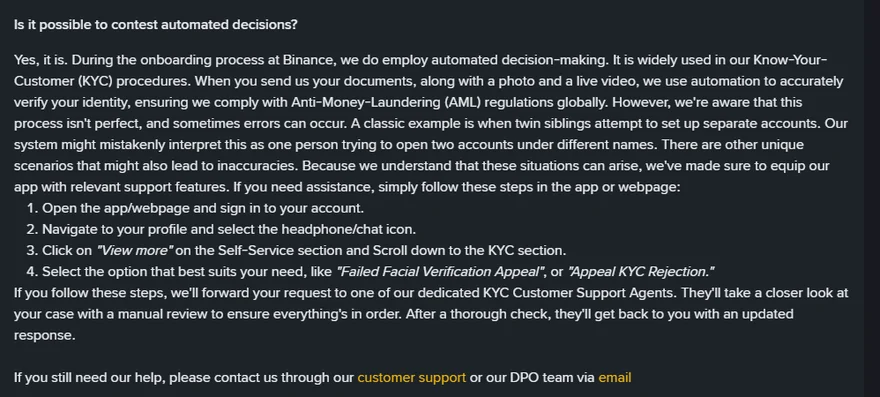
If you believe a rejection is wrong, appeal before contacting support. The KYC section of Self-Service (profile, the headphone or chat icon, then “View more”) also offers “Appeal KYC Rejection”, and Binance says a KYC agent then takes “a closer look at your case with a manual review”.
Binance’s withdrawal page gives a second route: [Withdraw appeal] on the alert on the Withdraw Crypto page, or [Appeal] in the pop-up under [Wallets], [Spot], [Withdraw] in the app. If no [Appeal] button is shown, it says to contact Binance Support.
For support, use the support entry in the app or on the website while logged in. Give the exact text of the rejection message, the document type and issuing country, which device and app version you used, and what you have already changed between attempts. A screenshot of the message helps; do not send a photo of your document in a chat.
Search results for a failed verification include pages selling “verified accounts” and phone numbers presented as support. Check any contact on Binance Verify before you trust it.
Sources · checked October 2026
Step instructions, the liveness rules and the “cannot change once confirmed” rule are from Binance’s “How to Complete Identity Verification for a Personal Account?” (updated 5 June 2026). The 10-attempt limit is from “How to Set up a Binance Account (Migrant Residents)” (updated 19 December 2025); the mismatch review is from a Binance Blog verification FAQ on Binance Square, read in October 2026. Proof-of-address rules are from “How to Verify My Residential Address on Binance?” (updated 20 April 2026). The appeal routes are from Binance’s Privacy Portal (no date shown) and “How to Reactivate the Withdrawal Function for My Binance Account?”. Binance does not publish a list of rejection codes; the six rows in the first table group the messages its pages describe. Binance’s own instructions are on How to Complete Identity Verification; the appeal steps are on How to Reactivate the Withdrawal Function.
Rejections, retries and the face check
How many times can I retry Binance verification?
Binance's help pages allow up to 10 verification attempts a day; after 10 refusals within 24 hours, you wait 24 hours. Repeating the same submission uses attempts without changing the result, so change the photo, the light, the device or the document type first.
Why does the face verification keep failing?
Binance's instructions are to allow camera access, keep your whole face visible and centred with your eyes open, remove hats and glasses, avoid filters, have sufficient light, and not refresh or quit during the check. Binance also says facial verification may fail because of technical difficulties or device issues, and offers a Failed Facial Verification Appeal, which sends the case to a manual review.
Can I change my name or date of birth after verification was rejected because of a typo?
Before you press Continue on the confirmation step, yes: correct anything that does not match the document. After confirmation, Binance says the details cannot be changed by you. A typo is not one of the listed reasons for an identity update, and Binance's update page says to consult customer service when your reason is not on its list.
Is it safe to pay someone to get my verification approved?
No. Offers to pass verification for you, or to sell an account that is already verified, are not a Binance service, and Binance's verification page says you cannot transfer your account to another person or substitute another person's ID for yours.