What to clear before closing a Binance account, and what you lose
The Close Account button sits under Account, Security, Manage Account, and it works only once your history is downloaded and every account type is empty. Closing cannot be undone: a new account's verification may wait 30 days or more, and a new referral relationship earns nothing. Suspicious activity calls for Disable Account instead.
More than 5 USD left, an open loan, an Earn subscription, a futures balance or an active sub-account each block the closure; in the app the button is under [Account Center], [Security], [Manage Account].
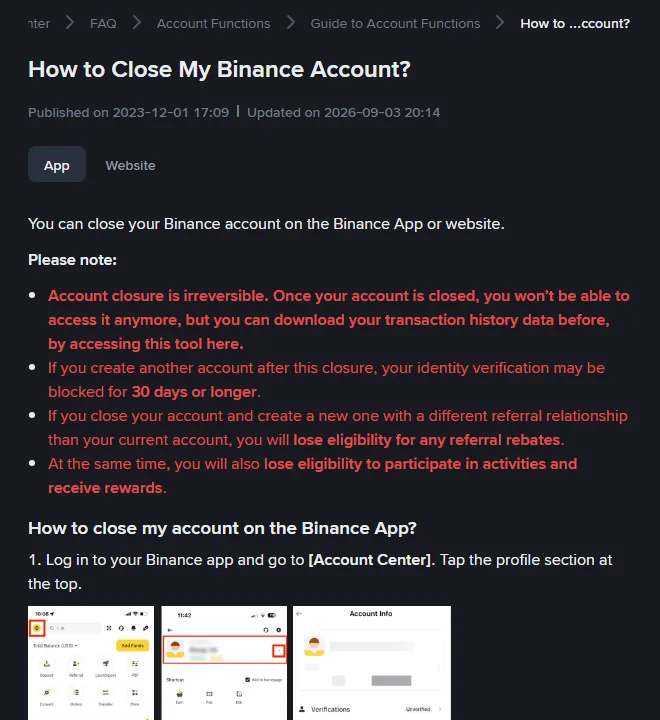
How to close a Binance account in the app, step by step
In the app:
- Log in and go to [Account Center]. Tap the profile section at the top.
- Go to [Security]. Scroll down to [Manage Account].
- Tap [Close Account].
- Choose the reason for closing.
- Read the terms and conditions and tap [Continue].
- If assets remain, tap [Cancel] and move them first; the page warns that otherwise “these assets will be lost and cannot be recovered”. When the account is empty, check the acknowledgement box and tap [Close Account].
- Complete security verification.
- The account is closed.
On the website the same path runs from the profile icon through [Account], [Security], the account management section, and [Close].
Before closing: what must be empty
Binance’s page lists the states that block closure. All of them must be cleared first.
| What blocks closing | What to do | Where |
|---|---|---|
| More than 5 USD in the account | Withdraw it; convert dust to BNB first if needed | Wallet, Withdraw |
| Open loan orders | Repay and close them | Loans |
| A P2P order within the last 48 hours | Wait for it to complete | P2P orders |
| Earn subscriptions | Cancel them and move the funds out | Earn |
| A liability in the margin account | Repay it | Margin |
| Assets in the futures account | Transfer to Spot or Funding | Futures, Transfer |
| Active sub-accounts | Close them, each with no assets, API keys or open orders | Dashboard, Sub Accounts |
| An active Web3 wallet | Convert it to a private-key wallet and export it | Web3 Wallet |
Two more items do not block closing but are lost if skipped:
- Download your transaction history. The closure page points to a tool for this and says you can do it “before” closure. After closure there is no login to export from, and any other way back to the records is uncertain; see export your trade history.
- Remove what depends on the account. API keys used by bots or tax software, saved payment methods, and any service that logs in with your Binance account.
Sub-accounts and the Web3 wallet come first
Sub-accounts and the Web3 wallet each have their own small procedure, and both are irreversible in their own right.
Sub-accounts have to be closed one at a time from the master account’s dashboard. Binance’s sub-account page says a sub-account can only be closed when it has no assets, no API key and no open orders, that closing it “is irreversible”, and that its order history cannot be recovered afterwards. Transfer each sub-account’s balance back to the master first, from the master account’s dashboard.
The Web3 wallet is not a balance that can be withdrawn like a Spot balance. Binance’s closure page requires it to be converted to a private-key wallet first, and its deactivation FAQ describes the same two options: move the funds out of the wallet to another wallet, or use the export function to take the wallet, keys and all, into another app. Do this before anything else, because once the account is closed the wallet’s keys are no longer reachable through Binance.
Delete or disable a Binance account: which one?
You saw activity that was not yours. Do not close; disable. Binance’s disable page describes it as the response to “suspicious activity”, reachable from [Account], [Security], [Manage Account], [Disable Account]. Reopening later goes through an [Unlock] pop-up at login, with up to 48 hours before withdrawals and P2P work again. Closing in a panic does not undo what happened, and closing itself cannot be undone.
You want a new referral code. Closing does not get you one. Binance’s referral FAQ says that if the system detects an account closed to create a new one for referral benefits, it “reserves the right to terminate all referral commissions from the new account”, and the closure page says the new account loses rebate eligibility outright. The real options are in adding or changing a referral.
You want to stop using the exchange. Then closing is the right step. Also consider the lighter version: withdraw everything, remove API keys and payment methods, keep two-factor authentication on, and leave the empty account alone. It keeps the option of coming back without a 30-day verification block. Keep the registered email working too: Binance’s terms describe a dormant-account process for accounts not accessed for a long time, with a notice first and a monthly fee among the possible steps, covered in locked out of a Binance account.
The three options side by side:
| Option | Reversible | Verification on return | Referral and rewards | When it fits |
|---|---|---|---|---|
| Leave the account empty with 2FA on | Yes, log back in | None needed | Unchanged | You might come back, or want the history available |
| Disable the account | Yes, through the Unlock pop-up, then a 48-hour hold on withdrawals and P2P | None needed | Unchanged | You suspect someone else has access, or want a hard pause |
| Close the account | No | May be blocked 30 days or longer on a new account | Lost on a new account with a different referral | You are leaving the exchange and have exported everything |
What happens after a Binance account is closed
Binance’s closure page opens with four warnings:
Account closure is irreversible. If you create another account after this closure, your identity verification may be blocked for 30 days or longer. If you close your account and create a new one with a different referral relationship than your current account, you will lose eligibility for any referral rebates. At the same time, you will also lose eligibility to participate in activities and receive rewards.
Access. Gone. “Once your account is closed, you won’t be able to access it anymore.”
Personal data. Retained for a while. Binance “is legally obliged to retain certain sets of your personal data” for the period required by anti-money laundering and similar laws, or needed for disputes, and removes it when that period expires. Closing is not deletion.
Registering again. Allowed, with the costs in the warnings above. The referral FAQ adds that a new account under the same identity with a different referral is treated as a duplicate identity, with commissions terminated and no rebate for the user. The identity details also count as “used on another account” for the 180-day condition on the referral binding page. Whether the same ID can open accounts on other exchanges after closing, and how long each makes you wait, is in re-registering with the same ID.
Open positions, loans, Earn. They block closure, so you will have closed, repaid or redeemed them yourself before the account can close.
Account closed by Binance: the deactivation notice
If the closure is Binance’s decision, you receive a deactivation notice with a date. That process is different: all products stop except withdrawals, deposits are not credited, derivatives are closed progressively, loans are liquidated with a 2% fee, and the FAQ says Binance “may not be able to share the reason”. It is covered under the deactivation section of withdrawals suspended or account restricted.
Closing a Binance account: the order of steps
- Decide between disable, leave empty, and close.
- Export the full transaction history and any tax reports.
- Redeem Earn, repay loans and margin, close futures positions, finish P2P.
- Close sub-accounts, export and convert the Web3 wallet.
- Withdraw everything to an address you control; convert dust to BNB.
- Remove API keys, payment methods, connected apps.
- Close from Account, Security, Manage Account, and keep the confirmation email.
Binance pages and terms used · checked October 2026
The closure page, “How to Close My Binance Account?” (updated 3 September 2026), supplied the steps, the list of what blocks closing and the warnings quoted above. The disable and unlock steps are from “How to Disable My Binance Account” (updated 24 November 2025) and “How to Unlock My Binance Account?” (updated 26 February 2026). Referral consequences are from the “Frequently Asked Questions on Binance Referral Pro Mode” (updated 5 August 2026). Deactivation handling is from “Why Did I Receive an Account Deactivation Notice?” (updated 13 May 2026). Re-read How to Close My Binance Account on the day you close, and compare its update date with the one above. The dormant-account note is from clauses 24.2 and 24.3 of the Binance Terms of Use in the 21 July 2026 version.
Disabling vs closing, your personal data, and reopening a closed account
What is the difference between disabling and closing a Binance account?
Disabling is temporary and reversible: Binance describes it as a way to protect your assets if you notice suspicious activity, and an Unlock pop-up lets you reopen the account after security checks, followed by up to 48 hours before withdrawals and P2P work. Closing is permanent: the closure page says account closure is irreversible and you will not be able to access the account again.
Does Binance delete my personal data when I close the account?
Not immediately. The closure page says Binance is legally obliged to retain certain personal data after closure for the period required by laws such as anti-money laundering rules, or needed for disputes, and that the data is removed when the mandatory retention period expires.
Can I reopen a closed Binance account?
No. Closure is irreversible. You can register a new account, but Binance's closure page warns that identity verification on it may be blocked for 30 days or longer, and that a new referral relationship earns no referral rebates and loses eligibility for activities and rewards.