Binance withdrawal suspended or account restricted: what your message means
A countdown means a security hold that no one can lift early. An Unlock pop-up is self-service. An Appeal button is a document path. A request for source-of-funds documents is a compliance review with no published limit. A deactivation notice means withdraw everything by the date given.
Account restricted to Withdraw Only, or withdrawals suspended: which Binance message is it?
| What the screen or email says | What it is | Clock | What to do |
|---|---|---|---|
| Withdrawal unavailable with a countdown, after you changed a password, email, phone, passkey or 2FA | Timed security hold | 24 hours after a password reset, up to 24 hours after an email change, up to 48 hours after the others; cannot be lifted early | Wait. Do not open a ticket, do not change anything else |
| “Your withdrawal may be at risk. You can try again in 24 hours” or “48 hours” | Risk-control hold on withdrawals | 24 or 48 hours as stated | Wait; check email for a review result |
| A pop-up at login with an [Unlock] button | Account disabled, self-service unlock available | Review time not published; then up to 48 hours before withdrawals and P2P work | Press [Unlock], pass the security checks, wait for the result |
| An alert on the Withdraw page with an [Appeal] or [Withdraw appeal] button | Failed identity or facial verification tied to withdrawals | Review time not published | Press the button, answer the questions carefully, upload what is asked |
| An email or in-app notice asking for source-of-funds documents, a questionnaire, or proof of address | Compliance review | No published limit | Supply exactly what is asked, once; ask support only whether anything is outstanding |
| “Your withdrawal function may be suspended due to risk of fraudulent activity” with a questionnaire or warning to acknowledge | Anti-scam measure on a specific withdrawal | Cool-down as shown | Complete the questionnaire, read the warning, wait out the cool-down |
| An “account deactivation notice” email with a date | Binance has ended the relationship under its terms | Withdraw-only until the date | Withdraw everything, NFTs first, close positions, repay loans; do not deposit |
| Withdrawal page says the asset or wallet is under maintenance | Not about your account | Until the network or wallet reopens | Set the reminder on the withdrawal page and wait |
A suspended withdrawal for one coin on a day the network is upgrading is not a restriction on you.
Withdrawals suspended after a password or 2FA change: the 24 to 48 hour hold
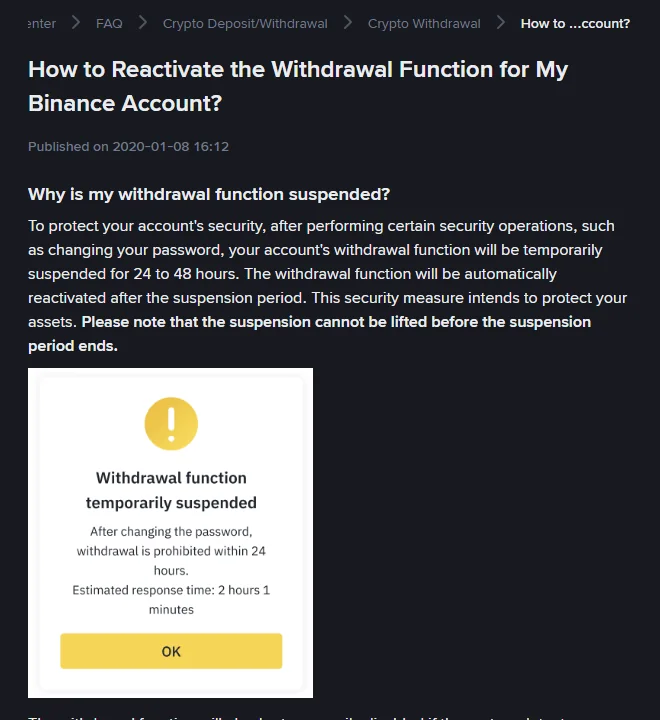
Binance’s withdrawal reactivation page puts it this way. “After performing certain security operations, such as changing your password, your account’s withdrawal function will be temporarily suspended for 24 to 48 hours. The withdrawal function will be automatically reactivated after the suspension period.” And: “the suspension cannot be lifted before the suspension period ends.”
The same hold follows other changes, with the figures from each page:
| Change | What is blocked | Hold |
|---|---|---|
| Password | Withdrawals, P2P selling, payment services, internal transfers | 24 hours on the reset page; 24 to 48 on the reactivation page |
| Withdrawals, internal transfers, P2P | Up to 24 hours (the email page said 48 until its 14 October 2026 update) | |
| Phone number | Withdrawals, internal transfers, P2P | Up to 48 hours |
| 2FA reset, including passkeys | Withdrawals, P2P selling, internal transfers, payment services | Up to 48 hours |
| Account unlocked after being disabled | Withdrawals, P2P | Up to 48 hours |
The countdown on the withdrawal screen is the authoritative figure. Nothing in the account, and no support agent, moves it. The only useful preparation is to make security changes when you do not need to move funds, and to space them out, because each change starts its own hold.
Password, email or 2FA changed, but not by you: what to do first
The countdown is reassuring when you changed the password yourself. It is the opposite when you did not. A hold that appears after a change you never made means someone else has been in the account, and the hold is the only thing standing between them and a withdrawal.
In that order, without waiting for the countdown: change the password of the email account first, because that is how the intruder resets things; then, from a device you trust, disable the Binance account under [Security], [Manage Account], [Disable Account], which Binance describes as the step for “any suspicious activity”; then open a support case from the website chat with the time of the change you did not make. Check the activity log for the device and location ([Account Activities] in the app, [Devices and Activities] on the website, both under [Security]) and keep screenshots. Unlock only once the email account and every password are new.
Suspended due to risk of fraudulent activity: the anti-scam checks
One message is about a withdrawal rather than the account. The reactivation page describes it as “Your withdrawal function may be suspended due to risk of fraudulent activity”, and says it appears when a withdrawal “seemingly links to identified patterns of fraudulent action”. What follows is not an appeal but a set of anti-scam measures: a questionnaire about the withdrawal, warning messages to acknowledge, and a cool-down before the withdrawal proceeds.
These are aimed at people being talked into sending money by someone else. If that is you, the questionnaire is the moment to stop and read it. If it is not, answer it plainly, acknowledge the warnings, and wait out the cool-down.
Account disabled: the Unlock pop-up at login
If the account has been disabled, by you after a suspicious login or by Binance’s risk system, the login page shows a pop-up with [Unlock]. Binance’s unlock page describes the steps. Press [Unlock] and complete the security verifications, which “will be required depending on the status of your account”. One of three results follows. If the unlock succeeds you are in, with up to 48 hours before withdrawals and P2P work. If it is under review, wait for the email. If it fails, try again or contact support.
If you disabled the account yourself because you saw activity that was not yours, do not unlock until you have changed the password of the email account first; the person who got in once can get in again through the same door.
Withdraw appeal and facial verification appeal: how they work
Binance’s withdrawal reactivation page describes two appeals that live on the withdrawal screen. If identity verification failed and withdrawals are blocked, “go to the Withdraw Crypto page and click [Withdraw appeal] on the alert, then submit the required documents”; on the app, [Wallets], [Spot], [Withdraw], then [Appeal]. If facial verification failed for technical reasons, [Appeal] leads to the Facial Verification Appeal page, where you “may need to answer security questions before submitting”, upload the materials the page shows examples of, and add anything useful under [Additional Information]. The result comes by SMS or email. If there is no [Appeal] button, the page says to contact support.
Answer the security questions carefully: the page warns that otherwise “your appeal may be rejected”.
How long a Binance compliance review takes: no published clock
A compliance review is the one restriction with no published clock. It begins with a notice asking for something, such as bank statements, a source-of-funds explanation, a proof of address, or a questionnaire about ties to a country. Binance’s pages describe pieces of it but no duration, and its withdrawal page says plainly that restrictions can be “provisional proactive restrictions on withdrawal or trading functionalities” imposed to “secure users’ accounts and maintain platform integrity”.
The document list for each source of funds is in Binance asks for source of funds. What you can control is the reply: exactly what the notice asks for, in the format it asks for, through the link it provides, once. Avoid sending unrelated documents, opening several tickets about the same review, or changing account details while it is open.
Ask support whether anything is outstanding on the case; Binance’s pages give no date for these reviews. The page is explicit that “not all account restrictions are open for appeal. This is particularly true in instances involving law enforcement orders or regulatory obligations.”
Binance publishes no duration for compliance reviews, so do not plan around the 48 hours of a security hold.
After a Binance deactivation notice: withdraw by the date
A deactivation notice means Binance “is no longer able to provide services to you in line with its Terms of Use”. The FAQ sets out what follows. All products except crypto withdrawal stop; new deposits “will not be credited and may result in permanent losses”; derivatives positions left open are closed progressively with normal fees; outstanding loans are liquidated with a 2% fee; and Binance “may not be able to share the reason behind account deactivation due to regulatory requirements”. The same FAQ says a new account cannot be created: “each customer is only allowed to have one verified Binance account.” What that rule means in other situations is in one account per person.
The FAQ gives the order. Withdraw NFTs first while there is still crypto to pay gas; redeem Earn positions; close derivatives; repay loans to unlock collateral; convert small balances to BNB; withdraw everything to an external address, not to another Binance user through Pay, which “will not go through”; and export the transaction history while you can still log in, as described in export your trade history.
What every restriction has in common
- The path is inside your own account: a countdown, a pop-up, a button, a link in an official email. Nothing requires a third party.
- Support is reached through the support entry in the app or on the website, not through a phone number or social-media account found in a search.
- None of Binance’s pages describes paying anyone to lift a restriction. Treat “unlock for a fee” offers and “verified account” sellers as scams.
- Check a restriction message that did not arrive inside the account on Binance Verify before acting on it.
If the restriction is a lockout rather than a hold, because 2FA or the email is gone, the way back in is in locked out of a Binance account.
Binance help pages used · checked October 2026
The message table was built from “How to Reactivate the Withdrawal Function for My Binance Account?” (published 8 January 2020, no later update shown), which also supplies the hold durations, the two appeal routes and the statement that not all restrictions can be appealed. The unlock steps are from “How to Unlock My Binance Account?” (updated 26 February 2026). Deactivation consequences and the one-account statement are from “Why Did I Receive an Account Deactivation Notice?” (updated 13 May 2026). Holds after email, phone and 2FA changes are from “How to Change My Binance Account Email?” (updated 14 October 2026), “How to Reset My Phone Number for SMS Verification” (updated 11 March 2026) and “How to Reset 2FA When I Can’t Access My Binance Account?” (updated 18 March 2026). Wallet maintenance is from “What Can I Do When Withdrawal Services Are Temporarily Suspended?”. Match your message against How to Reactivate the Withdrawal Function first and How to Unlock My Binance Account second; the wording in the table is theirs.
Holds, reviews and what support can do
How long are Binance withdrawals suspended after changing my password?
Binance's password reset page says withdrawals, P2P selling, payment services and internal transfers are disabled for 24 hours after a reset; the older withdrawal reactivation page gives 24 to 48 hours for security operations in general, reactivating automatically and not liftable early. An email change carries a hold of up to 24 hours on withdrawals, internal transfers and P2P; phone and 2FA changes carry up to 48 hours.
Can Binance support lift a withdrawal suspension early?
Not a timed security hold; the page says the suspension cannot be lifted before the period ends. For restrictions Binance imposed on a specific account, support is the channel to ask or appeal, but the same page notes that not all restrictions are open for appeal, particularly those involving law enforcement orders or regulatory obligations.
My account is under a source-of-funds review. How long will it take?
Binance publishes no time limit for compliance reviews. Send exactly what was requested, once, through the link in the notice, and ask support only whether anything is outstanding on the case. No third party can shorten it.
Someone offers to unlock my Binance account for a fee. Is that possible?
No. Unlocking happens through the Unlock pop-up or an appeal inside your own account, and none of Binance's pages describes a paid unlock. Do not pay anyone, or give anyone a verification code or your login, to unlock an account.
What does Withdrawal Only mean on Binance?
The account can withdraw, cancel orders, close positions and redeem, and nothing else. Binance applies it to accounts that have not completed the current verification level and, during an identity update, until the new details are verified. Completing the verification lifts it.
Can I deposit while my account is restricted?
Binance's hold pages list what a security hold blocks, such as withdrawals, internal transfers and P2P, and do not mention deposits. After a deactivation notice it is different: Binance says new deposits will not be credited and may be lost. If you are unsure which state the account is in, do not deposit until the notice or the support case says so.