Locked out of a Binance account: lost 2FA, lost phone, or forgotten email
Lost 2FA with a known login goes through the reset page. Lost 2FA and password goes through support with your ID. A forgotten email or phone goes through the Forgot Account appeal with an ID photo and a short video. None of the routes needs anyone outside the exchange.
| You know the login | You know the password | Lockout | What to do |
|---|---|---|---|
| Yes | Yes | Lost 2FA: authenticator, SMS number, passkey or email code | The 2FA reset page, self-service |
| Yes | No | Lost password, and possibly 2FA | [Forgot password?] if any 2FA works; support if none does |
| No | Either | Forgotten login contact | The Forgot Account appeal, with ID and video |
| Unsure | Unsure | A dormant account from years ago | Find the login first (old accounts), then one of the above |
Anyone who offers to recover the account for a fee cannot get you in.
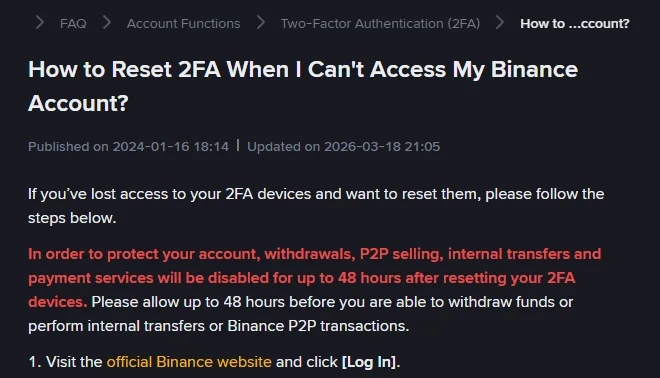
New phone, Google Authenticator gone: the 2FA reset
It is self-service, from the login page:
- On the official website, click [Log In], enter your email or phone number, click [Next].
- If a passkey prompt appears, click [Cancel], then [My Passkeys Are Not Available]; the passkey case is covered in Binance passkey not working. Skip if no prompt.
- Enter your password and click [Next].
- On the Security Verification Requirements page, select the method you no longer have, and click [Security verification unavailable?] on the pop-up.
- On the Reset Security Verification page, tick every method you have lost, then [Confirm Reset]. The page stresses: “Please check all the 2FA devices that you’ve lost access to.” Ticking one and leaving another that is also gone sends you round again.
- Read the pop-up and click [Confirm]. It states the cost: withdrawals, P2P selling, internal transfers and payment services disabled for up to 48 hours.
- Verify with the methods you still have.
- If asked, enter a new phone number or email, [Get Code], verify, [Submit].
- Wait for the result.
The result is one of these. If the reset succeeds, log in with the new methods. [Application Denied] means a method you ticked as lost still works, so check and try again. [Under Review] means a team is checking, which “may take up to 24 hours”, and you are told by email at the new verified address.
Then, once in, add two methods, not one. An authenticator app plus a passkey, or either plus email, so that the next lost phone is an inconvenience rather than a reset.
Only one 2FA method still works: what it can reset
The reset works by verifying you with whatever you still have, so what you still have decides how far you can get on your own.
| Still working | Can reset | Cannot reset without support |
|---|---|---|
| Email code only | A lost authenticator, SMS number or passkey | Nothing; email alone is enough for every reset Binance’s page describes |
| SMS code only | A lost authenticator, email or passkey | Nothing, while the number keeps receiving codes |
| Authenticator app only | A lost email, phone or passkey | Nothing |
| Passkey only, on a device you still have | A lost email, phone or authenticator | Nothing |
| None of the four | Nothing | Every reset; this is the support-with-ID case |
Any single surviving method is enough to run the reset, which is why the page insists on ticking every lost method at once rather than one at a time. The account that ends up with none of the four is the one that had a single second factor, which is why adding a second method once you are back in matters.
Lost password, with or without 2FA
If at least one 2FA method still works, [Forgot password?] on the login page sends a reset through it. A changed password triggers its own 24-hour hold on withdrawals, P2P selling, payment services and internal transfers.
If no 2FA method works either, the reset page says plainly that “if you’re unable to reset your password because you can’t access any 2FA, please contact our Customer Support.” Use the support entry on the website or in the app. Have the document used at verification ready; identity is the only thing left to check you against.
Forgot which email or phone number you used for Binance
Before any appeal, try the login page with every address and number you have ever used.
If none is recognised, Binance has a self-service “Forgot Account” appeal, with separate links for accounts that completed verification and accounts that did not. The links appear on the “Need help to login?” page after a failed login, in the Verification Center when verification is unsuccessful, and through the support chatbot. The steps, from Binance’s page:
- Read the notes and have your ID card ready, ideally the one used for verification.
- Select your nationality, matching the ID.
- Upload one photo of the ID with the number visible: not cropped, no glare, not blurry. For digital IDs, a screenshot.
- Record a statement video: hold the document facing the camera, face clearly visible, and read the given sentence with the date filled in. If you cannot speak English, write the English statement on paper and hold it with the ID while saying it in your own language. One continuous take, no cuts, clear audio. Accepted video formats are MP4, MOV and RMVB, and the document in the video must be the one you uploaded.
- Optionally, record a video showing a deposit to the account from another platform’s withdrawal record. Screen recordings are not accepted; it has to be a video of the screen with your face at the start or end.
- Submit. The appeal is “typically” reviewed “within 1 working day (weekends excluded)”.
The outcome is the account’s masked contact details, after which you are back to one of the first two cases.
Recovering an old account you have not used in years
To find it, try every email and phone number you have used, then the Forgot Account appeal. Binance says it may ask users to re-verify “from time to time”, so you may meet a verification prompt once you are in, with the account in “Withdraw Only” until it clears; see updating verified identity details.
The account may also have changed state while you were away. Binance’s terms describe a dormant account process. After 90 days without the account being accessed, a notice is sent; if there is no response within 30 days, the account can be treated as dormant, which the terms say may involve converting the assets, charging a monthly dormant account fee, transferring the assets to a third party such as a custodian, closing open positions, and closing the dormant account. Coming back after a closure means registering again, with the consequences set out in re-registering with the same ID.
Once you are back in, an account that is more than 90 days old, has never had a referrer, and has not traded or used any product for 90 days is the one kind of older account that can still be linked to a referral, through Binance’s Affiliates Recall Program.
If you cannot find the old account and open a new one, the new one cannot be verified while the old one holds your identity. That is the old account announcing itself; go back to recovery rather than forward to a second identity. See one account per person.
What follows every recovery
- A hold on withdrawals, P2P and transfers: up to 48 hours after a 2FA reset, a phone change or an unlock; up to 24 hours after an email change; 24 hours after a password reset. The withdrawal screen shows the countdown.
- A verification prompt if the account’s documents are expired or below the current standard.
- A look at the activity log ([Account Activities] in the app, [Devices and Activities] on the website, both under [Security]), to see whether anyone else has been in.
Account recovery services: why none of them can get you in
Searching for a way back in brings up “recovery services” that charge to retrieve accounts, “support” phone numbers, and forum posts offering an “inside contact”. Every route above is self-service or runs through the support entry on Binance’s own site and app. Nothing in any route requires giving a code, a password or a seed phrase to a person, and nothing costs money. A sender claiming to be Binance can be checked on Binance Verify, as described in how to tell the real Binance site from a copy.
Sources · checked October 2026
The reset steps, hold and review time are from Binance’s “How to Reset 2FA When I Can’t Access My Binance Account?” (updated 18 March 2026); Binance’s Learn article of the same name gives the review time as up to 48 hours. The forgotten-contact route is from “How to Appeal for ‘Forgot Account’ on Binance?” (updated 26 January 2026). The password hold is from “How to Reactivate the Withdrawal Function for My Binance Account?” and Binance’s password reset page; the email and phone holds from its email change page (updated 14 October 2026) and phone reset page (updated 11 March 2026); re-verification “from time to time” from its re-verification FAQ (updated 14 March 2026). Dormant account treatment is from clauses 24.2 and 24.3 of the Binance Terms of Use in the 21 July 2026 version we read, which is the one for its Abu Dhabi-regulated entities; other Binance entities publish their own, which set the 90-day notice and 30-day response periods and mention a monthly fee without stating its amount. Two pages carry the actual forms: How to Reset 2FA for the reset, and How to Appeal for Forgot Account for the appeal.
Authenticators, old accounts and what to tell support
I got a new phone and my Google Authenticator for Binance is gone. What now?
If the authenticator was backed up or exported, restore it on the new phone. If not, use Binance's 2FA reset: log in with email or phone and password, choose the unavailable method, click Security verification unavailable, tick the authenticator as lost, verify with your remaining methods, and wait. Withdrawals, P2P selling, internal transfers and payments are disabled for up to 48 hours afterwards; a reset sent to review may take up to 24 hours.
I do not remember which email I used for my old Binance account.
Try every email and phone you have owned on the login page first. If none works, Binance's Forgot Account appeal takes your nationality, a photo of your ID, and a short statement video reading a given sentence with the date, and is typically reviewed within 1 working day, weekends excluded.
Can Binance support just give me access if I prove who I am?
None of Binance's pages describes support restoring access from a chat. The pages send you to the self-service steps, and name one case for support: a lost password combined with no working 2FA, where Binance's reset page says to contact customer support. Expect to prove identity with the document used at verification.
Does a Binance account get closed if I do not log in for years?
It can be treated as dormant. Binance's terms describe notifying users after 90 days without the account being accessed, and, if there is no response within 30 days, treating the account as dormant, which can include fees and eventually closure. The clock in those terms runs from Binance's notice, not from a calendar, so the thing to keep working is the email address the notices go to.