Creating a Binance account: each screen in order, from email to verified
On the Binance sign-up page you enter an email or phone number and press Register, agree to the terms, enter the 6-digit code, set a password and confirm the referral code. That last screen is the only permanent one, and the easiest to skip past.
Signing up on the Binance website: five screens in order
-
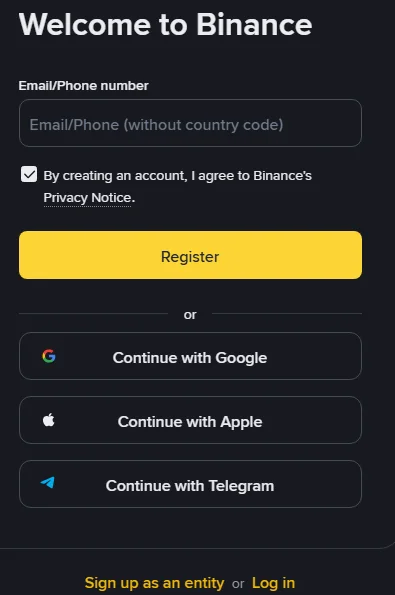
Open the Binance sign-up page, enter your email address or phone number, and press [Register]. If nobody has given you a referral code, open the page through this site’s referral link; the code is then filled in for you on the fifth screen. Signing up this way does not raise your fees. Cobalt Desk may earn a commission from the fees Binance collects, and the share returned to you is up to 20%*, paid back after the trade rather than taken off the price.
On the page, the field is labelled “Email/Phone number” and the hint text inside it says “without country code”. Below it, a pre-ticked box says that by creating an account you agree to the privacy notice.
-
Agree to the terms and press [Next]. Binance’s guide says your address or number is carried over and you confirm the Terms of Service and Privacy Policy with a checkbox.
-
Enter the 6-digit code and press [Submit]. The code goes to the address or number you entered and, in Binance’s words, you must “enter the code within 30 minutes”. If nothing arrives, the fixes are in Binance verification code not received.
-
Set a password and press [Next]. The rule is “at least 8 characters, with at least one uppercase letter and one number”. Do not reuse a password from any other site: leaked email-and-password pairs are tried against exchanges as a matter of routine.
-
Confirm the referral code and press [Next]. The screen says the account has been created and shows the referral field. If you arrived through a referral link, the code is already filled in with a green tick and the word [Linked] beside it. If you came through this site’s link and the field is empty, type ZY1818 and wait for the tick.
After the fifth screen Binance sends you to identity verification. Sign-up itself ends here.
Where the referral code goes: three things you may see
The field appears once, on the fifth screen. You will see one of three states.
- A code is filled in, with a green tick and [Linked]. The link you used carried a code and Binance accepted it. Check that it is the code you intended, then press [Next].
- The field is empty. You opened the site directly, or the code did not carry over from the link. Type the code by hand, for example one a friend gave you, and wait for the tick before continuing.
- The field says the code is invalid. The guide’s wording is “you may edit it or enter another one”. Check for a stray space, and for a letter O typed as a zero. If it is still rejected, confirm the code with the person who gave it to you, or use another.
The code sets up a lasting arrangement. The referrer decides, when creating the code, what share of the trading-fee commission is passed back to the referred account, and that share follows the relationship. Binance’s referral FAQ states the rule in one line: “once the referral relationship has been established, it cannot be changed or removed.” If you have already registered without a code, do not close the account to try again; read adding or changing a referral on an existing account first.
Referral Lite or Referral Pro: which link is it?
Binance runs two referral modes and a new user can only be referred through one of them. Referral Lite pays the referrer a one-time voucher; Referral Pro pays the referrer an ongoing share of your trading fees, part of which can be returned to you as a fee rebate. Binance’s referral introduction states that a user who registers through Referral Lite “will not be eligible to sign up again using Referral Pro mode”. If a friend sends you a link, ask which mode it is. This site’s link is a Referral Pro link. Whether a Pro code is worth having depends on how much of the commission its referrer shares, not on how much you trade.
How the rebate reaches you
The rebate is not a discount at the moment of the trade. Binance charges the listed fee, then returns the agreed share in USDC; its referral FAQ says the amount is calculated hourly and deposited in the Spot account within 6 hours. There is no need to trade in order to check it; how to check that your referral code is linked describes what to look for after the next trade you were going to make anyway.
Signing up on the Binance mobile app, or with Google, Apple or Telegram
The app follows the same order: [Sign up], [Create a Binance Account], choose a method, then code, password, referral and verification. The app guide adds one line the website guide does not: “If you have no referral code, you can skip this step.” Skipping is the same as leaving the field blank; it can only be filled later under the conditions in adding a referral to an existing account.
Google or Apple sign-up: press [Continue with Google] or [Continue with Apple], sign in inside the pop-up, confirm the terms, then press [Next] back on Binance. It is quicker, at the cost of tying the exchange login to that Google or Apple account: lose access to one and you have a problem with the other.
Telegram: press [Continue with Telegram], then [Connect], log in to Telegram, press [Confirm], then choose [Create a new Binance Account]. You still enter an email or phone and a code. The guide ends with “You can bind your referral code at this step if applicable.”
| Sign-up method | What you log in with | Where the referral field appears | Suits |
|---|---|---|---|
| Email or phone | The address or number plus your password | The screen after the password | Anyone who wants the account to stand on its own |
| Google or Apple | That Google or Apple account | After confirming the terms back on Binance | People who already run everything through that account |
| Telegram | Your Telegram account | The last step of sign-up | People who use Telegram to sign in everywhere |
The referral field appears exactly once, whichever way you sign up. Email and password is the easiest to troubleshoot, because its screens match Binance’s guide line for line.
Sign-up fields that are easy to get wrong
| Field | What the screen shows | Common mistake | Cost of the mistake |
|---|---|---|---|
| Phone number | Hint text inside the field says “without country code” | Typing the country code | Code never sends; re-enter and continue |
| Account type | Personal by default; “Sign up as an entity” at the bottom | Starting the entity sign-up by accident | Type cannot be changed; you would need a separate account |
| Referral code | Appears after the password screen; may be left blank | Pressing [Next] without seeing the green tick | Cannot be modified once linked; late binding has conditions and closes at the first deposit |
| Residence and document country | Two separate questions at the start of verification: where you live, and which country issued the document | Treating them as the same question, or choosing a country you do not live in | Document does not match; verification is returned or refused |
Residence and issuing country are different questions: where you live now, and which country issued your document. A passport holder living abroad answers them differently, and that is correct. If you move later, the residence on the account has to be updated, with a proof of address for the new one.
Choices worth making before you press Register
Which login to use. The email address or phone number you enter becomes your login name and the place where codes and withdrawal confirmations arrive. Pick one you will still control in five years. A work address, a university address or a temporary inbox are poor choices; changing a login later is more work than registering.
Personal or entity account. The sign-up page defaults to a personal account; a small link at the bottom reads “Sign up as an entity”. The sign-up guide warns: “Once registered, you cannot change the account type.” An individual trading their own money wants the personal account.
Whether Binance serves where you live. Eligibility is checked against your residence and, in some cases, your citizenship, and both are verified against documents later. How the residence check works, and what to do if your country is not served, is in what you need before opening an exchange account. Entering a false residence to get past this check creates an account that fails at verification, with any deposit stuck inside it.
Binance KYC after sign-up: documents, face check, waiting
Registration asks for no documents, but Binance’s verification page states that all new users must complete the [Verified] level “to access Binance products and service offerings, including cryptocurrency deposits and trades”. The entry point is [Account], then [Identification], or the [Get verified] banner on the home screen.
You need a valid government-issued document and a device with a working camera. The steps on the website are:
- Select your residence, the document’s issuing country or region, and the document type.
- Upload from the current device, or scan the QR code to continue on your phone. Binance notes that the manual-upload option “depends on the country”.
- Photograph the document; for an ID card, upload both the front and the back, then press [Continue].
- Complete the liveness check. The page’s instructions: allow camera access; no hats, glasses or filters; enough light.
- Confirm your personal information and press [Continue].
Step 5 is the one to slow down on. The page says: “Please make sure that all the information entered is consistent with your ID documents. You won’t be able to change it once confirmed.” Compare every character on that screen with the document before pressing [Continue]. Attempts are limited too: Binance’s help pages allow up to 10 verification attempts a day, and after 10 refusals within 24 hours you wait 24 hours.
The same document can verify one personal account. If the system reports that your identity is already used on another account, check first whether you opened one before and forgot it; the ways back into an old account are in locked out of a Binance account; do not try to get past it with a relative’s document, because the verification page says plainly that you cannot “substitute another person’s ID for your ID”.
[Verified] is the level everyone needs; it takes the document and the face check. Binance’s page says the verification level determines the account’s trading limit, and that depending on your region or payment channel you may need to raise it. The [Identification] page shows the current level and what the next one asks for, which can include a proof of address; a new account does not need more until something asks for it. If a submission is refused, why Binance verification fails sorts the reasons by the message on screen.
Then the review. Binance’s wording is that documents “are usually reviewed within 48 hours”, and “it may take longer in some particular cases”. Avoid resubmitting during the wait; each submission uses one of the day’s attempts. If it runs past 48 hours, or the status says more documents are needed, how long Binance verification takes explains the three different waits and what to do in each.
Secure a new Binance account on day one
A fresh account has a password and nothing else. The sign-up guide ends with: “we highly recommend enabling at least 1 two-factor authentication (2FA).” Do it before any money goes in.
- An authenticator app or a passkey. Under [Account], then [Security], add an authenticator app or a passkey. Keep SMS as a backup at most, not as the only second factor: it fails when you travel or change number. If you set up a passkey, read when Binance asks for a passkey you do not have before you ever change phones.
- An anti-phishing code. A short string you choose; Binance then includes it in every genuine email and, in selected countries, in certain SMS messages. An email without it is not from Binance. For an SMS the code is only proof where your country is covered, so check the security log and Binance Verify as well.
- A withdrawal address whitelist. Once on, withdrawals go only to addresses you have saved, which limits what someone else could do with the account.
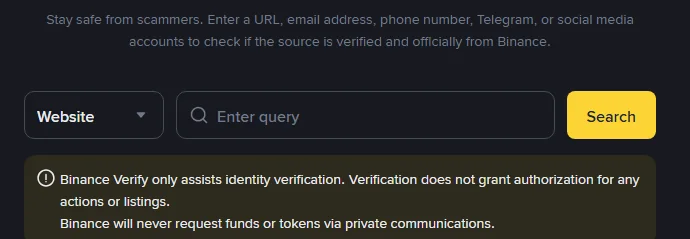
Also keep one address in mind: Binance Verify, at binance.com/en/official-verification, checks whether a website, email address, phone number, Telegram handle or social account is official. The page carries a sentence worth remembering: “Binance will never request funds or tokens via private communications.”
Before the first deposit
Once the verification notice arrives the account is usable. Spend five minutes on these before funding it; each is harder once money is inside.
- Is the referral linked? If you saw the green tick and [Linked], nothing to do. If you skipped it and want the rebate, bind it now: one of the binding conditions is that the account has “no deposit or trading activity”, so the first deposit closes that door.
- Is there more than one second factor? SMS alone means a lost phone locks you out. Add an authenticator or passkey.
- Is the login email one you will keep? Changing it now is a few clicks; changing it later disables withdrawals for up to 24 hours.
- Are the verified name and document number right? They cannot be edited by you; Binance’s identity update page says to consult customer service for a correction that is not one of its listed update reasons, so report a misread early. For the legal name or the date of birth, the app’s Verification Center, as shown on that same page, points to a “Name Correction Appeal” or a “Date of Birth Correction Appeal”. See updating verified identity details.
Make the first deposit small, confirm it arrives, confirm a withdrawal works, then scale up. Any problem in the chain shows up while it is cheap.
Is this the real Binance sign-up page? How to check
The sign-up itself is low risk. The risk is being on the wrong site. Copies of the page can be close enough that the address bar is the only reliable difference. Before typing an email address, check three things.
- The domain. Website sign-up lives under
accounts.binance.com; the help centre underwww.binance.com. The registered domain isbinance.com. Anything with an extra word, letter or hyphen is not it. - How you got there. A search advert, a stranger’s direct message or a shortened link in a group is not a reason to start typing. Enter the domain yourself, or check the link in Binance Verify.
- What it asks for. The sign-up page wants an email or phone number, a code, and a new password. A page that asks for a seed phrase, a private key, a card PIN or a deposit “to activate the account” is not a sign-up page.
The same applies to the app: install it from the link on the official site or from your phone’s app store, never from a file someone sends you.
Sign-up time limits, from the 30-minute code to the 30-day referral window
| Period | What it applies to | After it passes |
|---|---|---|
| 30 minutes | Validity of the 6-digit sign-up code | Request a new one |
| 10 attempts per 24 hours | Identity verification submissions | Wait a day before trying again |
| About 48 hours | Usual document review time | Ask through the in-app support entry; check whether more documents were requested |
| 30 days | Window for binding a skipped referral code, provided there has been no deposit or trade and the other conditions hold | The binding page refuses; only the recall and rebind routes remain, each with stricter conditions |
If you skipped the code and want the rebate, bind it before the first deposit, not after the first trade.
Sign-up problems: no code, referral code not working, stuck verification
No email code. Check you are looking at the address you typed; check spam and promotions folders; check the mailbox is not full; company mail filters can block exchange mail, so a personal address at a major provider is more reliable. Do not press resend repeatedly; with several codes in the inbox it is easy to enter a stale one.
No SMS. Binance does not deliver SMS to every country, and keeps a list of supported ones. Within a supported country: check signal, turn off call-blocking apps, restart, or switch to voice verification. Outside the list, register with an email address instead. The full order is in verification code not received: checks in order.
Referral code rejected. Check for a stray space or a letter O typed as a zero; the three states of the referral field show what each one means. A typed code must show the green tick before you continue.
Verification still under review. Inside 48 hours, wait. After that, use the support entry in the app or website; never a “support” contact found through a search engine or social network.
Verification returned. Follow the reason in the notice and redo that part: document fully in frame, no glare, details matching the document. If the same reason comes back twice, change something real, such as the light or the device, rather than resubmitting the same photos. The reasons and fixes are in Binance verification failed or ID rejected.
The page closed halfway through. Go to the login page and try the email or phone you used. If it says the account does not exist, start over; if it logs in, the account was created and you can pick up at verification.
The email is already registered. You have an account you forgot. Use [Forgot password?] on the login page rather than registering again with a different address; one person has one verified personal account.
Sources · checked October 2026
Screens and button names follow Binance’s help pages “How to Register on the Binance Website?” and “How to Register on the Binance App?” (both updated 24 November 2025) and “How to Complete Identity Verification for a Personal Account?” (updated 5 June 2026), compared against the English sign-up page at accounts.binance.com on 13 October 2026. Referral rules are from the “Frequently Asked Questions on Binance Referral Pro Mode” (updated 5 August 2026) and the “Introduction to the Binance Referral Program” (updated 25 March 2026). The 10-attempts limit is stated in “How to Set up a Binance Account (Migrant Residents)” (updated 19 December 2025) and in a Binance Blog verification FAQ on Binance Square. The rebate share is set by the referrer when the code is created; Binance’s live referral pages are the ones that count. Binance changes these pages; the website sign-up guide is at How to Register on the Binance Website, and the verification steps at How to Complete Identity Verification for a Personal Account. If a screen no longer matches, tell us.
Referral, email and verification: what people ask during sign-up
Do I need a referral code to sign up for Binance?
No. The field is optional and the app lets you skip it. The difference shows up later in trading fees: with a code that carries a fee rebate, part of each spot and futures trading fee is returned to you at the share the referrer set, for as long as the programme's conditions hold (futures rebates run for a limited period after the futures account opens); without one you pay the listed fee. Because the code cannot be modified once it is linked, it is worth deciding before the screen, not after.
I skipped the referral code. Can I add it later?
Only under conditions. Binance allows binding on its referral binding page within 30 days of registration, before any deposit or trade, on a parent account with no existing referral. Older accounts have two further routes, recall and rebind, each with its own conditions, described in the guide on adding a referral to an existing account.
Should I register with an email address or a phone number?
Either works, and the other can be added afterwards. An email address is unaffected by changing carriers, losing a SIM or travelling, so codes keep arriving. A phone number is one less thing to type at login. For an account you expect to keep for years, an email address you control and will still have is the safer login name, with the phone number added as a second contact.
Can I use Binance without completing identity verification?
Not in practice. The identity verification page states that all new users must complete the Verified level to access Binance products and services, including crypto deposits and trading. Registration itself needs no documents, but an unverified account cannot be funded or used to trade.