Email or phone number for a crypto exchange account: pick the one you will still have
Both work, and you can add the other afterwards. Email survives a new carrier, a lost SIM and a trip abroad; SMS does not reach every country. Register with an email you will keep, then add the phone.
When the email-or-phone choice matters
| Situation | Registered with email | Registered with phone |
|---|---|---|
| Travelling, or living abroad for a while | Codes arrive as normal | SMS may not arrive in a country outside Binance’s SMS coverage list |
| Changing carrier or number | Nothing changes | Change the number in security settings first; withdrawals pause for up to 48 hours |
| Phone lost or SIM dead | Log in with email, reset the lost SMS method through the 2FA reset | Login name still works if you remember it, but every code goes to a number you no longer have until the reset completes |
| Forgot which contact is on the account | Try the email addresses you own on the login page; last resort is the Forgot Account appeal with ID and video | Same, with phone numbers |
The 48-hour figure is from Binance’s pages on resetting a phone number and resetting 2FA, each of which says withdrawals, internal transfers and P2P are disabled “for up to 48 hours” afterwards. Its email page, since its 14 October 2026 update, gives up to 24 hours for an email change.
What the login actually does
The address or number you register with does four jobs, and they matter in a different order from the one people expect.
- It receives the codes. Every sign-in from a new device, every withdrawal, every security change sends a code here. If the code cannot arrive, the account is stuck.
- It identifies the account when you need help. Binance’s “Forgot Account” appeal exists for people who no longer know the email or phone on the account; it needs an ID photo and a statement video, and is reviewed “typically within 1 working day (weekends excluded)”. Knowing the login avoids all of that.
- It is the address other people would try first. A leaked email-and-password pair from any other site can be tried against exchange logins. The login name is half of what an attacker needs.
- It is what you type. The least important job, and the only one a phone number does better.
Email: what it gets right and wrong
An email address does not change when you switch mobile carriers, lose a phone, or cross a border. A code sent to it can be read on any device. If the account is ever locked, the email is where the exchange writes to you, and the “Forgot Account” route exists precisely because losing both contacts is the hardest case.
Its weaknesses are the ones you choose. A work address goes with the job. A university address expires. A small provider’s address can bounce or be filtered; Binance’s own advice is to register “with email addresses from common domains”. An inbox with a weak password is a door into the exchange account, so the email account itself needs a strong password and its own second factor.
Phone: what it gets right and wrong
A phone number is quick to type and most people remember it. That is the whole list of advantages.
Against it: Binance does not deliver SMS everywhere and keeps a list of supported countries; outside the list its advice is to use “passkeys, BAuthenticator, or Google Authenticator as your primary 2FA”. Inside the list, SMS fails on weak signal, in flight mode, and when a call-blocking app discards the sender. A number given up when you move country takes the account’s codes with it. And a phone number can be moved to a new SIM by someone who talks a carrier into it, and the codes then go to their SIM.
For these reasons the phone should be a second contact and a backup code channel, never the only one.
Securing the email account behind the login
Choosing email as the login moves the weakest point one step back, to the mailbox. Three settings on the email account matter more than any setting on the exchange. The mailbox password must be unique to it, because a leaked mailbox password is a leaked exchange login. The mailbox needs its own second factor, so that a password alone does not open it. And the mailbox’s recovery options, the backup phone number and the recovery address, need to be ones you still control, because an attacker who can reset the mailbox can reset everything behind it. The large providers offer all three settings.
Can you open a crypto exchange account without a phone number?
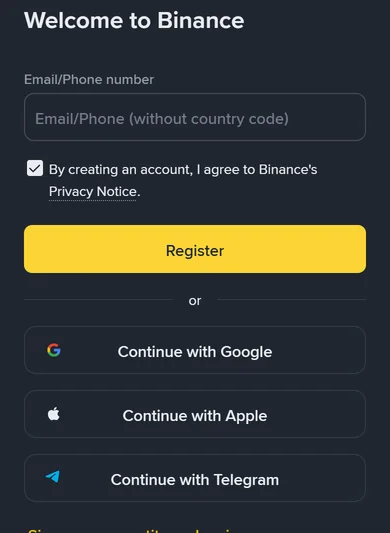
Yes, wherever the sign-up form accepts an email address as the login, which on Binance is the same field that takes a phone number. Register with the email and add a number later, as a backup rather than as the login.
- Register with an email address at a major provider that you use for nothing disposable, protected by a password used nowhere else and by its own second factor.
- Finish verification.
- In the security settings, add an authenticator app or a passkey as the second factor. Then add the phone number as SMS verification, as a backup.
- Write down which email and which number are on the account, somewhere you will find it in five years. The “Forgot Account” appeal is for people who did not.
Each sign-up screen, including the referral field that appears after the password, is described in creating a Binance account.
If you already registered with a phone number, nothing is broken. Add an email in the security settings, make an authenticator or passkey the main second factor, and the phone becomes the backup it should have been. How each change is made on Binance, and what to do when the old contact no longer works, is in changing your email or phone number.
Sources · checked October 2026
Hold periods and the advice to use common email domains and non-SMS second factors are from Binance’s pages “How to Change My Binance Account Email?” (updated 14 October 2026), “How to Reset My Phone Number for SMS Verification” (updated 11 March 2026), “How to Reset 2FA When I Can’t Access My Binance Account?” (updated 18 March 2026), “Why Can’t I Receive SMS Verification Codes?” and “Why Can’t I Receive Emails from Binance?”. The forgotten-contact route is from “How to Appeal for ‘Forgot Account’ on Binance?” (updated 26 January 2026). If your country is missing from Supported Countries for SMS Verification, register with email.