Binance will not let you sign up: find your message, then the fix
A failed Binance sign-up stops at one of a few points: the 6-digit code, the phone number, the password rule, the referral field, a region pop-up, or a page that closed after the password. Match it to the message on your screen; each has its own fix, and none of them needs a second account.
| What you see | What it means | What to do |
|---|---|---|
| No 6-digit code, or the code is refused | The email or SMS did not arrive, or more than 30 minutes passed | Check the inbox or phone, then request a new code |
| The phone number is not accepted, or no SMS ever comes | The number’s country may not be on Binance’s SMS list | Register with an email address instead |
| The password is not accepted | It misses one of three rules | 8 characters, one uppercase letter, one number |
| The referral code shows as invalid | Usually a typing slip | Check spaces and the letter O against the number 0 |
| A pop-up says it looks like you are in another country | Binance has matched your connection to a place it serves through a different site | Check where you are eligible to sign up |
| The page or app closed partway | Whether an account exists depends on the last screen | Log in or start again |
| The email or phone number is already on an account | You, or someone using that address, registered before | Recover that account instead |
| It fails only in the app | The app runs the same screens | Sign up on the website, then log in to the app |
If none of these matches, go back to the first screen and follow each Binance sign-up screen in order; the screen where it stops tells you which fix above to use.
No 6-digit code, or the code is refused
Binance’s sign-up help page says the 6-digit code goes to the email address or phone number you entered, and must be entered within 30 minutes. A code older than that is refused even if you type it correctly, so request a new one rather than retrying the old one.
When the code does not arrive at all, Binance’s help pages list these checks:
- Email: look in the spam folder, check that the inbox is not full, and check the address for a typing slip. Binance recommends registering with an address from a common provider such as Gmail or Outlook.
- SMS: make sure the phone has signal, turn off call-blocking, firewall or security apps that may block Binance’s number, restart the phone, and try voice verification instead.
Each check in more detail, with the order to try them in, is in verification codes that do not arrive.
The phone number is not accepted, or no SMS comes
Binance publishes a list of supported countries for SMS verification, last updated in February 2026, and says some countries and regions are not covered. If yours is not on it, codes by SMS will not reach you whatever you try.
The fix is to register with an email address in the same field. The phone number can be added later, as a backup, once the account works. Binance’s own advice for areas outside SMS coverage is to use a passkey, BAuthenticator or Google Authenticator as the main second check at login (2FA).
Enter the number without the country code: on the sign-up page the field’s hint says “Email/Phone (without country code)”.
The password is not accepted
Binance’s sign-up help page gives the rule in one sentence: at least 8 characters, with at least one uppercase letter and one number. If it is refused, check for a capital letter and a digit as well as the length.
Use a password you use nowhere else, and store it where you will find it again. The [Forgot password?] link is there, but a reset is followed by a pause on withdrawals, so it is better not to need it in the first week.
The referral code shows as invalid
The referral field appears after the password, once the account has been created. Binance’s help page says that if the code is invalid, you may edit it. Check for a space before or after the code, and for a letter O typed in place of the number 0, or the other way round. A code is accepted when the green tick and [Linked] appear beside it.
What each state of the field means, and the other reasons Binance gives for refusing a code, are in Binance referral code not working or invalid. The field cannot be changed once linked, so check the characters before pressing [Next].
A pop-up says you seem to be in another country
Binance checks where the connection comes from when the sign-up page opens. Opened from the United States on 10 November 2026, the page covered the form with a pop-up offering Binance.US instead:
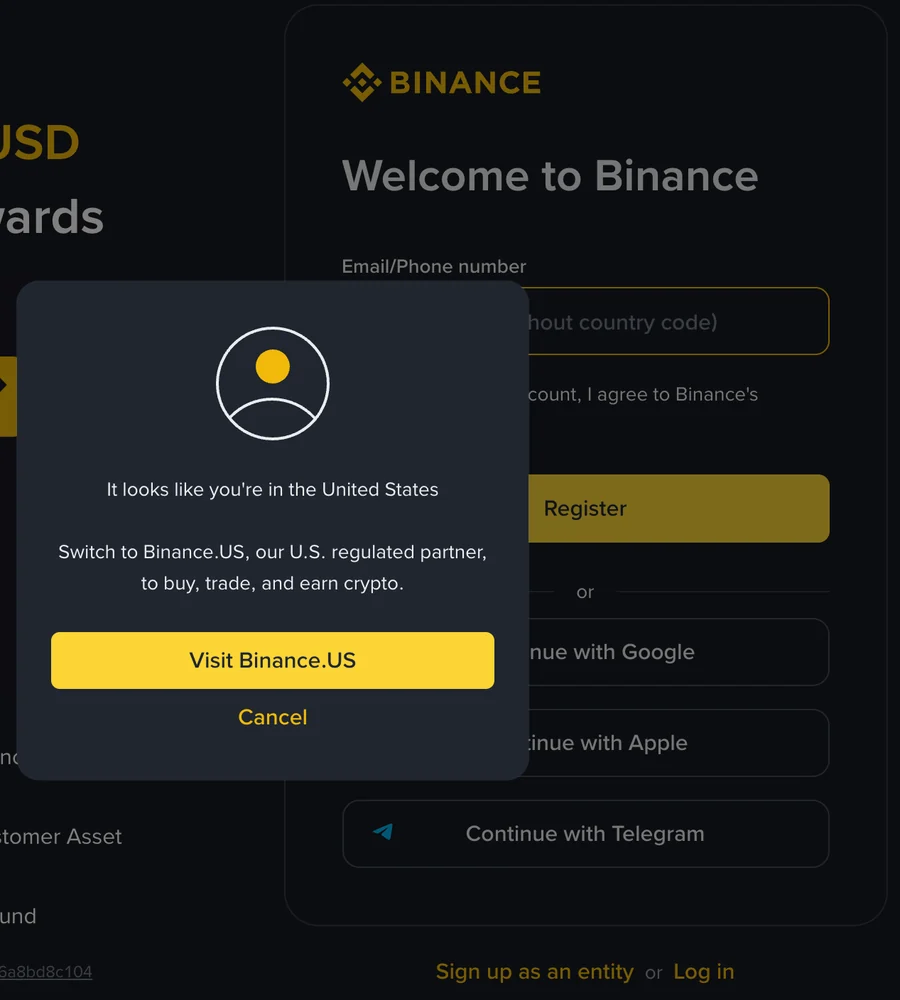
A pop-up like this is about where you live, not about the form. The country you sign up from must be one where Binance serves residents, and identity verification later checks your declared country against your document and, where asked, a proof of address. Getting past the pop-up does not change that. What to settle about residence before signing up is in what to have ready before you sign up.
The page or app closed partway
With an email address or phone number, Binance’s sign-up help page counts the account as created once the password is set: the next screen opens with “Congratulations! You have successfully created a Binance account”, and the referral field comes after that.
- You set a password before it closed. The account exists. Log in with the same email or phone number and password; do not register again.
- You stopped before the password. Nothing was created. Start again from the first screen.
- You signed up with Google, Apple or Telegram. There is no password screen. Binance’s help page says the account is created once you confirm the terms back on Binance (Google, Apple) or enter the code sent to your email or phone (Telegram). Log in with the same Google, Apple or Telegram button instead of registering again.
- It closed on the referral screen. The account exists. Binance’s help page does not say whether a code filled in from a referral link stays linked if the page closes before [Next]. If no code is linked, one can still be added later only under Binance’s conditions, the main ones being no existing referral, within 30 days of registration and before any deposit or trade; see binding within 30 days.
The email or phone number is already on an account
If the address or number you enter is already linked to an account, that account is the one to use. Try logging in with it and use [Forgot password?] if needed. If you no longer know which email or phone number the old account uses, Binance’s “Forgot Account” appeal is the way it describes for that, with separate links for accounts that were never verified and accounts that completed verification. The one for an unverified account also appears on the “Need help to login?” page after a failed login; the one for a verified account appears in the Verification Center when verification is unsuccessful.
Opening a second account with a different address does not get around this for long: Binance allows one personal account per person, and verification on a second account runs into the identity already used on the first. Finding the first account is covered in identity already in use on another account.
It fails only in the app
The app asks for the same things in the same order. If it keeps failing there, sign up on the website first, starting from the first Binance sign-up screen, then install the app and log in with the same email or phone number and password. The account is the same either way.
Before you try again
- Use one email address or phone number and stick to it until the sign-up is finished; switching between several leaves half-started attempts you will have to sort out later.
- Do not pay anyone who offers to “unlock” a sign-up or register an account for you. Each of these fixes is done on Binance’s own pages, by you, without a fee.
- Check that the referral field is right before pressing [Next]; once a code is linked, Binance says it cannot be modified.
Sources · checked November 2026
Binance help pages, checked on 10 November 2026: “How to Register on the Binance Website?” and “How to Register on the Binance App?” (both updated 24 November 2025) for the 30-minute code, the password rule, the point where the account is created and the referral field; “Why Can’t I Receive SMS Verification Codes?” and “Why Can’t I Receive Emails from Binance?” for the code checks; “Supported Countries for SMS Verification on Binance” (updated February 2026) for SMS coverage; “How to Appeal for ‘Forgot Account’ on Binance?” (updated 26 January 2026) for a forgotten email or phone number. Also used, with the update dates each page showed in October and November 2026: “How to Reset Your Binance Account Password?” (updated 15 April 2026) for the pause on withdrawals after a reset; “Frequently Asked Questions on Binance Referral Pro Mode” (updated 5 August 2026) for the conditions on adding a code later; and “How to Complete Identity Verification for a Personal Account?” (updated 5 June 2026) with “Why Did I Receive an Account Deactivation Notice?” (updated 13 May 2026) for one account per person. The region pop-up and the field hint were seen on the Binance sign-up page on 10 November 2026; no details were entered or submitted. What appears on the page can depend on your location and change without notice.
Binance sign-up problems: what people ask
Why is Binance not sending me a sign-up code?
For email, Binance's help page lists the spam folder, a full inbox and the address itself, and recommends registering with a common provider such as Gmail or Outlook. For SMS, it lists signal, call-blocking or security apps, a restart and voice verification, and some countries are not on Binance's SMS coverage list at all. The sign-up code has to be entered within 30 minutes.
What are the Binance password requirements at sign-up?
Binance's sign-up help page says the password must contain at least 8 characters, with at least one uppercase letter and one number. A password that misses any of the three is not accepted.
If I closed the page during sign-up, do I have a Binance account?
It depends on the last screen you finished. Binance's sign-up help page says the account has been created once the password is set, before the referral screen. If you set a password, log in with that email or phone number instead of registering again. If you stopped before the password, nothing was created and you start again from the first screen. With Google, Apple or Telegram there is no password step: the account exists once you confirmed the terms (Google, Apple) or entered the code (Telegram).