Deleting the Binance app does not delete the account
Did you remove the Binance app expecting the account to go with it? It did not. The app was one way in; the account, its balances and its login are still with Binance, and closing it is a separate step you take on the website or in a reinstalled app.
| What the account holds | Where Binance has you deal with it |
|---|---|
| The account and its login | [Close Account], in the app or on the website |
| Spot and Funding balances | Withdraw them; more than 5 USD blocks closure |
| Futures funds | Move them to Spot or Funding |
| Earn subscriptions | Cancel them and withdraw the funds |
| Open Loan orders and margin debt (money borrowed for trading) | Close the orders, repay the debt |
| Sub-accounts and the Web3 wallet | Close the sub-accounts; convert the Web3 wallet to a private-key wallet |
| API keys used by bots, trackers or tax tools | Remove the ones you no longer use |
| The log of logins and actions | Readable on the website under [Devices and Activities] |
To close the account yourself, you go through Binance’s [Close Account] steps in the app or on the website, and the last of them is a security verification. Until you do, the account stays open. You can keep it empty and secured, or close it properly. An account with money in it that nobody logs in to falls under Binance’s rules for unused (dormant) accounts instead.
Using Binance without the app
The website opens the same account, and the closure, disable and security log pages all have a website version. Log in with the same email or phone number, password and verification methods. Each of those paths starts from the [Profile] icon, then [Account] and [Security]; closing and disabling sit further down, under [Account Management].
If you reinstall the app instead, you log in again. If that phone also held your authenticator app or passkey (a login key kept on the phone or synced through a password manager), or you have since reset or replaced it, a verification method may no longer work. The way back then is a reset of two-factor authentication (2FA, the second code at login), covered in locked out of Binance after losing 2FA or a phone.
How to see which devices have logged in to your Binance account
Binance’s page on phishing SMS names where the security log sits:
- In the app: [Profile], [Account Info], [Security], [Account Activities].
- On the website: [Profile], [Account], [Security], [Devices and Activities].
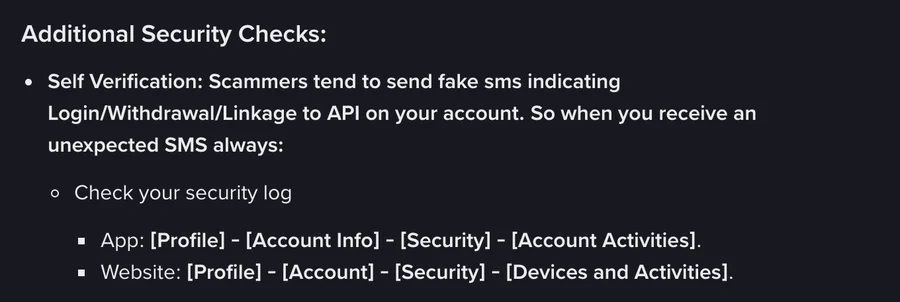
Binance’s security tips page describes what it holds: “Binance provides a log of all login attempts and actions taken.” Read it for logins and actions you do not recognise, including any after the day you removed the app.
If something there is not yours, the same page is direct: “You should Disable your Account from our official website or app immediately”, then report it through official customer support. Binance’s disable page offers that step for “suspicious activity”, in the app under [Manage Account] and on the website under [Account Management], and sends anyone whose account is already disabled to a separate page on unlocking it. So disabling stops the account while you check, and closure, which Binance calls irreversible, stays a decision for later.
The tips page also says to “Remove any unused or unnecessary API access.” API access means keys that let other tools act on the account. The page treats it as something you remove from the account, and uninstalling the app is not that step. Check which keys are still listed and delete the ones no tool of yours needs.
What happens to a Binance account nobody opens
Binance’s terms count access to the account and say nothing about the app. Clause 24.2 says that “if you have not accessed your Binance Account for a continuous period of 90 days, we will send you notice of our intention to treat your account as dormant.”
If there is no reply within 30 days, the steps Binance may take under clause 24.3 include marking the account as dormant, converting its assets to a different digital asset, charging “a dormant account fee” withdrawn “on a monthly basis”, and closing the dormant account “at any time”. The whole process, with the transfer to a custodian, is summarised in recovering an old account you have not used in years.
Two clauses matter for an account left behind with the app. Clause 24.6 says Binance is under no obligation to pay “any reward, incentive or interest” to a dormant account, which affects anything still sitting in Earn. Clause 24.4 says each step comes with notice “via email or any such other method” Binance chooses, so the email the notices go to has to keep working. If that address is one you are about to lose, change the email on the Binance account while you can still log in.
Keep it or close it
Disabling, closing and leaving an account empty are compared side by side in delete or disable a Binance account: which one?. For an account you stopped opening when the app came off your phone, these are the parts that differ.
Keeping it
- Log in on the website or in the reinstalled app, and read the security log.
- Withdraw what you do not want held there, and remove API keys for tools you no longer use.
- Keep two-factor authentication on and the registered email working, since dormant notices go there.
- Log in at least once every 90 days: clause 24.2 counts days without the account being accessed, not days without the app.
Closing it
- Download your transaction history first, because after closure there is no login to export from: export your trade history before closing.
- Clear what blocks closure. Binance’s page lists more than 5 USD in the account, open Loan orders, a P2P order from the last 48 hours, Earn subscriptions, margin debt, funds in Futures, active sub-accounts and an active Web3 wallet. Assets still there at the final confirmation “will be lost and cannot be recovered”.
- In the app go to [Account Center], [Security], [Manage Account], [Close Account]; on the website go to [Account], [Security], [Account Management], [Close].
- Pass the security verification. Binance’s page says: “Account closure is irreversible.”
Every blocking item, what to do about each, and the order to clear them are in how to delete a Binance account step by step. Opening a new account later with the same identity has its own wait, set out in re-registering after closing an account.
Why uninstalling and closing are separate steps
Binance’s closure page opens with: “You can close your Binance account on the Binance App or website.” Apple’s App Review Guidelines, rule 5.1.1(v), describe deletion as something the app itself offers: “If your app supports account creation, you must also offer account deletion within the app.”
Sources · checked November 2026
The closing paths for the app and the website, the items that block closure and the quoted warnings are from Binance’s “How to Close My Binance Account?” (updated 3 September 2026, checked again on 10 November 2026). The disable paths and the “suspicious activity” wording are from “How to Disable My Binance Account” (updated 24 November 2025), which points to “How to Unlock My Binance Account?” for an account that is already disabled. The security log paths are from “How to Protect Your Crypto from Phishing SMS with Anti-Phishing Code?” (updated 7 February 2026). The activity log, API key and disable advice is from “Binance Account Security Tips” (published 18 January 2018; the page shows no update date). The dormant-account steps are from clauses 24.2, 24.3, 24.4 and 24.6 of the Binance Terms of Use in the 21 July 2026 version for its Abu Dhabi-regulated entities; clause 24.3 also allows transfer to a third party, a contractual claim in place of the assets, and closing out open positions; other Binance entities publish their own terms. The app store rule is from Apple’s App Review Guidelines, rule 5.1.1(v) (last updated 16 October 2026), read in November 2026. Rules change: before acting, re-read How to Close My Binance Account and the security log paths on the anti-phishing SMS page, and compare their update dates with the ones above.
Uninstalling, closing without the app, and accounts nobody uses
Does uninstalling the Binance app delete my account?
No. Uninstalling removes the app from that phone. The account stays open with everything it holds, and you can still log in on the Binance website. To close it, you use Binance's Close Account steps, which end with a security verification.
Do I need the app to close my Binance account?
No. Binance's closure page gives a website path, Profile, Account, Security, Account Management, then Close, next to the app path. Balances over 5 USD and the other blocking items on that page must be cleared first, and anything still in the account at the final confirmation is lost and cannot be recovered.
Will Binance charge an account I no longer use?
It can. Clause 24.3 of the Binance Terms of Use in the 21 July 2026 version lists a dormant account fee, taken from the account monthly, among the steps Binance may take after 90 days without the account being accessed and 30 days without a reply to its notice. The terms do not state the amount.
Is anyone still logged in to my Binance account after I removed the app?
Check the security log rather than assume. It is under Profile, Account Info, Security, Account Activities in the app, and under Profile, Account, Security, Devices and Activities on the website. If a login is not yours, Binance's security tips page says to disable the account immediately and report it through official support.